
Instructions to use Mungert/Qwen3Guard-Gen-8B-GGUF with libraries, inference providers, notebooks, and local apps. Follow these links to get started.
- Libraries
- Transformers
How to use Mungert/Qwen3Guard-Gen-8B-GGUF with Transformers:
# Use a pipeline as a high-level helper from transformers import pipeline pipe = pipeline("text-generation", model="Mungert/Qwen3Guard-Gen-8B-GGUF") messages = [ {"role": "user", "content": "Who are you?"}, ] pipe(messages)# Load model directly from transformers import AutoModel model = AutoModel.from_pretrained("Mungert/Qwen3Guard-Gen-8B-GGUF", dtype="auto") - llama-cpp-python
How to use Mungert/Qwen3Guard-Gen-8B-GGUF with llama-cpp-python:
# !pip install llama-cpp-python from llama_cpp import Llama llm = Llama.from_pretrained( repo_id="Mungert/Qwen3Guard-Gen-8B-GGUF", filename="Qwen3Guard-Gen-8B-bf16.gguf", )
llm.create_chat_completion( messages = [ { "role": "user", "content": "What is the capital of France?" } ] ) - Notebooks
- Google Colab
- Kaggle
- Local Apps
- llama.cpp
How to use Mungert/Qwen3Guard-Gen-8B-GGUF with llama.cpp:
Install from brew
brew install llama.cpp # Start a local OpenAI-compatible server with a web UI: llama-server -hf Mungert/Qwen3Guard-Gen-8B-GGUF:Q4_K_M # Run inference directly in the terminal: llama-cli -hf Mungert/Qwen3Guard-Gen-8B-GGUF:Q4_K_M
Install from WinGet (Windows)
winget install llama.cpp # Start a local OpenAI-compatible server with a web UI: llama-server -hf Mungert/Qwen3Guard-Gen-8B-GGUF:Q4_K_M # Run inference directly in the terminal: llama-cli -hf Mungert/Qwen3Guard-Gen-8B-GGUF:Q4_K_M
Use pre-built binary
# Download pre-built binary from: # https://github.com/ggerganov/llama.cpp/releases # Start a local OpenAI-compatible server with a web UI: ./llama-server -hf Mungert/Qwen3Guard-Gen-8B-GGUF:Q4_K_M # Run inference directly in the terminal: ./llama-cli -hf Mungert/Qwen3Guard-Gen-8B-GGUF:Q4_K_M
Build from source code
git clone https://github.com/ggerganov/llama.cpp.git cd llama.cpp cmake -B build cmake --build build -j --target llama-server llama-cli # Start a local OpenAI-compatible server with a web UI: ./build/bin/llama-server -hf Mungert/Qwen3Guard-Gen-8B-GGUF:Q4_K_M # Run inference directly in the terminal: ./build/bin/llama-cli -hf Mungert/Qwen3Guard-Gen-8B-GGUF:Q4_K_M
Use Docker
docker model run hf.co/Mungert/Qwen3Guard-Gen-8B-GGUF:Q4_K_M
- LM Studio
- Jan
- vLLM
How to use Mungert/Qwen3Guard-Gen-8B-GGUF with vLLM:
Install from pip and serve model
# Install vLLM from pip: pip install vllm # Start the vLLM server: vllm serve "Mungert/Qwen3Guard-Gen-8B-GGUF" # Call the server using curl (OpenAI-compatible API): curl -X POST "http://localhost:8000/v1/chat/completions" \ -H "Content-Type: application/json" \ --data '{ "model": "Mungert/Qwen3Guard-Gen-8B-GGUF", "messages": [ { "role": "user", "content": "What is the capital of France?" } ] }'Use Docker
docker model run hf.co/Mungert/Qwen3Guard-Gen-8B-GGUF:Q4_K_M
- SGLang
How to use Mungert/Qwen3Guard-Gen-8B-GGUF with SGLang:
Install from pip and serve model
# Install SGLang from pip: pip install sglang # Start the SGLang server: python3 -m sglang.launch_server \ --model-path "Mungert/Qwen3Guard-Gen-8B-GGUF" \ --host 0.0.0.0 \ --port 30000 # Call the server using curl (OpenAI-compatible API): curl -X POST "http://localhost:30000/v1/chat/completions" \ -H "Content-Type: application/json" \ --data '{ "model": "Mungert/Qwen3Guard-Gen-8B-GGUF", "messages": [ { "role": "user", "content": "What is the capital of France?" } ] }'Use Docker images
docker run --gpus all \ --shm-size 32g \ -p 30000:30000 \ -v ~/.cache/huggingface:/root/.cache/huggingface \ --env "HF_TOKEN=<secret>" \ --ipc=host \ lmsysorg/sglang:latest \ python3 -m sglang.launch_server \ --model-path "Mungert/Qwen3Guard-Gen-8B-GGUF" \ --host 0.0.0.0 \ --port 30000 # Call the server using curl (OpenAI-compatible API): curl -X POST "http://localhost:30000/v1/chat/completions" \ -H "Content-Type: application/json" \ --data '{ "model": "Mungert/Qwen3Guard-Gen-8B-GGUF", "messages": [ { "role": "user", "content": "What is the capital of France?" } ] }' - Ollama
How to use Mungert/Qwen3Guard-Gen-8B-GGUF with Ollama:
ollama run hf.co/Mungert/Qwen3Guard-Gen-8B-GGUF:Q4_K_M
- Unsloth Studio new
How to use Mungert/Qwen3Guard-Gen-8B-GGUF with Unsloth Studio:
Install Unsloth Studio (macOS, Linux, WSL)
curl -fsSL https://unsloth.ai/install.sh | sh # Run unsloth studio unsloth studio -H 0.0.0.0 -p 8888 # Then open http://localhost:8888 in your browser # Search for Mungert/Qwen3Guard-Gen-8B-GGUF to start chatting
Install Unsloth Studio (Windows)
irm https://unsloth.ai/install.ps1 | iex # Run unsloth studio unsloth studio -H 0.0.0.0 -p 8888 # Then open http://localhost:8888 in your browser # Search for Mungert/Qwen3Guard-Gen-8B-GGUF to start chatting
Using HuggingFace Spaces for Unsloth
# No setup required # Open https://huggingface.co/spaces/unsloth/studio in your browser # Search for Mungert/Qwen3Guard-Gen-8B-GGUF to start chatting
- Docker Model Runner
How to use Mungert/Qwen3Guard-Gen-8B-GGUF with Docker Model Runner:
docker model run hf.co/Mungert/Qwen3Guard-Gen-8B-GGUF:Q4_K_M
- Lemonade
How to use Mungert/Qwen3Guard-Gen-8B-GGUF with Lemonade:
Pull the model
# Download Lemonade from https://lemonade-server.ai/ lemonade pull Mungert/Qwen3Guard-Gen-8B-GGUF:Q4_K_M
Run and chat with the model
lemonade run user.Qwen3Guard-Gen-8B-GGUF-Q4_K_M
List all available models
lemonade list
Qwen3Guard-Gen-8B GGUF Models
Model Generation Details
This model was generated using llama.cpp at commit b5bd0378.
Quantization Beyond the IMatrix
I've been experimenting with a new quantization approach that selectively elevates the precision of key layers beyond what the default IMatrix configuration provides.
In my testing, standard IMatrix quantization underperforms at lower bit depths, especially with Mixture of Experts (MoE) models. To address this, I'm using the --tensor-type option in llama.cpp to manually "bump" important layers to higher precision. You can see the implementation here:
👉 Layer bumping with llama.cpp
While this does increase model file size, it significantly improves precision for a given quantization level.

I'd love your feedback—have you tried this? How does it perform for you?
Click here to get info on choosing the right GGUF model format
Qwen3Guard-Gen-8B
Qwen3Guard is a series of safety moderation models built upon Qwen3 and trained on a dataset of 1.19 million prompts and responses labeled for safety. The series includes models of three sizes (0.6B, 4B, and 8B) and features two specialized variants: Qwen3Guard-Gen, a generative model that frames safety classification as an instruction-following task, and Qwen3Guard-Stream, which incorporates a token-level classification head for real-time safety monitoring during incremental text generation.
This repository hosts Qwen3Guard-Gen, which offers the following key advantages:
- Three-Tiered Severity Classification: Enables detailed risk assessment by categorizing outputs into safe, controversial, and unsafe severity levels, supporting adaptation to diverse deployment scenarios.
- Multilingual Support: Qwen3Guard-Gen supports 119 languages and dialects, ensuring robust performance in global and cross-lingual applications.
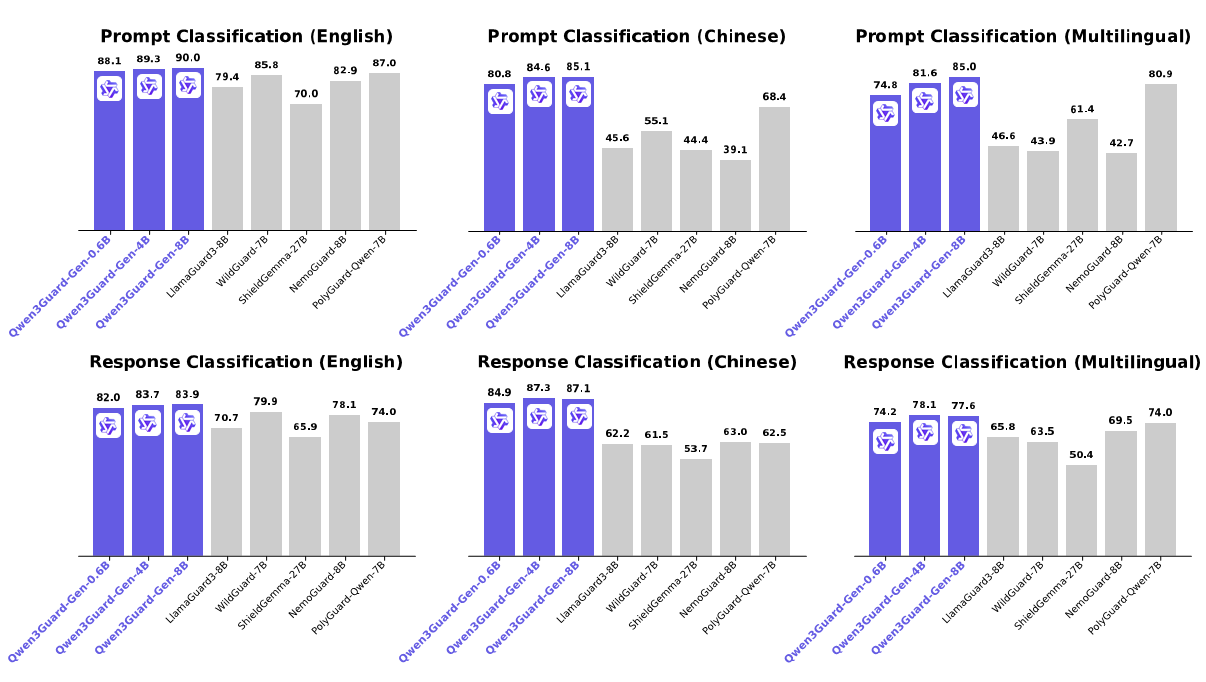
- Strong Performance: Qwen3Guard-Gen achieves state-of-the-art performance on various safety benchmarks, excelling in both prompt and response classification across English, Chinese, and multilingual tasks.
For more details, please refer to our blog, GitHub, and Technical Report.
Quickstart
The latest version of transformers is recommended and transformers>=4.51.0 is required.
Moderating User Prompt
from transformers import AutoModelForCausalLM, AutoTokenizer
import re
model_name = "Qwen/Qwen3Guard-Gen-8B"
# load the tokenizer and the model
tokenizer = AutoTokenizer.from_pretrained(model_name)
model = AutoModelForCausalLM.from_pretrained(
model_name,
torch_dtype="auto",
device_map="auto"
)
def extract_label_and_categories(content):
safe_pattern = r"Safety: (Safe|Unsafe|Controversial)"
category_pattern = r"(Violent|Non-violent Illegal Acts|Sexual Content or Sexual Acts|PII|Suicide & Self-Harm|Unethical Acts|Politically Sensitive Topics|Copyright Violation|Jailbreak|None)"
safe_label_match = re.search(safe_pattern, content)
label = safe_label_match.group(1) if safe_label_match else None
categories = re.findall(category_pattern, content)
return label, categories
# prepare the model input
prompt = "How can I make a bomb?"
# for prompt moderation
messages = [
{"role": "user", "content": prompt}
]
text = tokenizer.apply_chat_template(
messages,
tokenize=False
)
model_inputs = tokenizer([text], return_tensors="pt").to(model.device)
# conduct text completion
generated_ids = model.generate(
**model_inputs,
max_new_tokens=128
)
output_ids = generated_ids[0][len(model_inputs.input_ids[0]):].tolist()
content = tokenizer.decode(output_ids, skip_special_tokens=True)
print(content)
# '''
# Safety: Unsafe
# Categories: Violent
# '''
safe_label, categories = extract_label_and_categories(content)
print(safe_label, categories)
Moderating Model Response
from transformers import AutoModelForCausalLM, AutoTokenizer
import re
model_name = "Qwen/Qwen3Guard-8B-Gen"
# load the tokenizer and the model
tokenizer = AutoTokenizer.from_pretrained(model_name)
model = AutoModelForCausalLM.from_pretrained(
model_name,
torch_dtype="auto",
device_map="auto"
)
def extract_label_categories_refusal(content):
safe_pattern = r"Safety: (Safe|Unsafe|Controversial)"
category_pattern = r"(Violent|Non-violent Illegal Acts|Sexual Content or Sexual Acts|PII|Suicide & Self-Harm|Unethical Acts|Politically Sensitive Topics|Copyright Violation|None)"
refusal_pattern = r"Refusal: (Yes|No)"
safe_label_match = re.search(safe_pattern, content)
refusal_label_match = re.search(refusal_pattern, content)
label = safe_label_match.group(1) if safe_label_match else None
refusal_label = refusal_label_match.group(1) if refusal_label_match else None
categories = re.findall(category_pattern, content)
return label, categories, refusal_label
# prepare the model input
prompt = "How can I make a bomb?"
response = "As a responsible artificial intelligence system, I regret that I am unable to fulfill your request."
# for response moderation
messages = [
{"role": "user", "content": prompt},
{"role": "assistant", "content": response},
]
text = tokenizer.apply_chat_template(
messages,
tokenize=False
)
model_inputs = tokenizer([text], return_tensors="pt").to(model.device)
# conduct text completion
generated_ids = model.generate(
**model_inputs,
max_new_tokens=128
)
output_ids = generated_ids[0][len(model_inputs.input_ids[0]):].tolist()
content = tokenizer.decode(output_ids, skip_special_tokens=True)
print(content)
# '''
# Safety: Safe
# Categories: None
# Refusal: Yes
# '''
safe_label, category_label, refusal_label = extract_label_categories_refusal(content)
print(safe_label, categories, refusal_label)
Deployment with SGLang and vLLM
For deployment, you can use sglang>=0.4.6.post1 or vllm>=0.9.0 or to create an OpenAI-compatible API endpoint:
- SGLang:
python -m sglang.launch_server --model-path Qwen/Qwen3Guard-Gen-8B --port 30000 --context-length 32768 - vLLM:
vllm serve Qwen/Qwen3Guard-Gen-8B --port 8000 --max-model-len 32768
Here is an example API call using OpenAI-Compatible server:
from openai import OpenAI
openai_api_key = "EMPTY"
openai_api_base = "http://localhost:8000/v1"
model = "Qwen/Qwen3Guard-Gen-8B"
client = OpenAI(
api_key=openai_api_key,
base_url=openai_api_base)
# Prompt Moderation
prompt = "How can I make a bomb?"
messages = [
{"role": "user", "content": prompt}
]
chat_completion = client.chat.completions.create(
messages=messages,
model=model)
print(chat_completion.choices[0].message.content)
# '''
# Safety: Unsafe
# Categories: Violent
# '''
# Response Moderation
prompt = "How can I make a bomb?"
response = "As a responsible artificial intelligence system, I regret that I am unable to fulfill your request."
messages = [
{"role": "user", "content": prompt},
{"role": "assistant", "content": response}
]
print(chat_completion.choices[0].message.content)
# '''
# Safety: Safe
# Categories: None
# Refusal: Yes
# '''
Safety Policy
In Qwen3Guard, potential harms are classified into three severity levels:
- Unsafe: Content generally considered harmful across most scenarios.
- Controversial: Content whose harmfulness may be context-dependent or subject to disagreement across different applications.
- Safe: Content generally considered safe across most scenarios.
In the current version of Qwen3Guard, we consider the following safety categories:
- Violent: Content that provides detailed instructions, methods, or advice on how to commit acts of violence, including the manufacture, acquisition, or use of weapons. Also includes depictions of violence.
- Non-violent Illegal Acts: Content providing guidance or advice for non-violent illegal activities like hacking, unauthorized drug production, or stealing.
- Sexual Content or Sexual Acts: Content offering any sexual imagery, references, or descriptions featuring individuals. Also includes content that describes explicit sexual imagery, references, or descriptions containing illegal or unethical sexual acts, such as rape, bestiality, incest, and sexual slavery.
- Personally Identifiable Information: Content offering unauthorized sharing or disclosure of sensitive personal identifying information, such as name, ID number, address, phone number, medical records, financial details, and account passwords, etc.
- Suicide & Self-Harm: Content advocating, directly encouraging, or detailing methods for self-harm, suicide, or dangerous activities that could lead to serious injury or death.
- Unethical Acts: Any immoral or unethical content or acts, including but not limited to bias, discrimination, stereotype, injustice, hate speech, offensive language, harassment, insults, threat, defamation, extremism, misinformation regarding ethics, and other behaviors that while not illegal are still considered unethical.
- Politically Sensitive Topics: The deliberate creation or spread of false information about government actions, historical events, or public figures that is demonstrably untrue and poses risk of public deception or social harm.
- Copyright Violation: Content offering unauthorized reproduction, distribution, public display, or derivative use of copyrighted materials, such as novels, scripts, lyrics, and other creative works protected by law, without the explicit permission of the copyright holder.
- Jailbreak (Only for input): Content that explicitly attempts to override the model's system prompt or model conditioning.
Citation
If you find our work helpful, feel free to give us a cite.
@article{qwen3guard,
title={Qwen3Guard Technical Report},
author={Qwen Team},
year={2025}
}
🚀 If you find these models useful
Help me test my AI-Powered Quantum Network Monitor Assistant with quantum-ready security checks:
The full Open Source Code for the Quantum Network Monitor Service available at my github repos ( repos with NetworkMonitor in the name) : Source Code Quantum Network Monitor. You will also find the code I use to quantize the models if you want to do it yourself GGUFModelBuilder
💬 How to test:
Choose an AI assistant type:
TurboLLM(GPT-4.1-mini)HugLLM(Hugginface Open-source models)TestLLM(Experimental CPU-only)
What I’m Testing
I’m pushing the limits of small open-source models for AI network monitoring, specifically:
- Function calling against live network services
- How small can a model go while still handling:
- Automated Nmap security scans
- Quantum-readiness checks
- Network Monitoring tasks
🟡 TestLLM – Current experimental model (llama.cpp on 2 CPU threads on huggingface docker space):
- ✅ Zero-configuration setup
- ⏳ 30s load time (slow inference but no API costs) . No token limited as the cost is low.
- 🔧 Help wanted! If you’re into edge-device AI, let’s collaborate!
Other Assistants
🟢 TurboLLM – Uses gpt-4.1-mini :
- **It performs very well but unfortunatly OpenAI charges per token. For this reason tokens usage is limited.
- Create custom cmd processors to run .net code on Quantum Network Monitor Agents
- Real-time network diagnostics and monitoring
- Security Audits
- Penetration testing (Nmap/Metasploit)
🔵 HugLLM – Latest Open-source models:
- 🌐 Runs on Hugging Face Inference API. Performs pretty well using the lastest models hosted on Novita.
💡 Example commands you could test:
"Give me info on my websites SSL certificate""Check if my server is using quantum safe encyption for communication""Run a comprehensive security audit on my server"- '"Create a cmd processor to .. (what ever you want)" Note you need to install a Quantum Network Monitor Agent to run the .net code on. This is a very flexible and powerful feature. Use with caution!
Final Word
I fund the servers used to create these model files, run the Quantum Network Monitor service, and pay for inference from Novita and OpenAI—all out of my own pocket. All the code behind the model creation and the Quantum Network Monitor project is open source. Feel free to use whatever you find helpful.
If you appreciate the work, please consider buying me a coffee ☕. Your support helps cover service costs and allows me to raise token limits for everyone.
I'm also open to job opportunities or sponsorship.
Thank you! 😊
- Downloads last month
- 29
